WK2 DIGITAL TECHNOLOGY BRIDGE AND FILE FORMATS
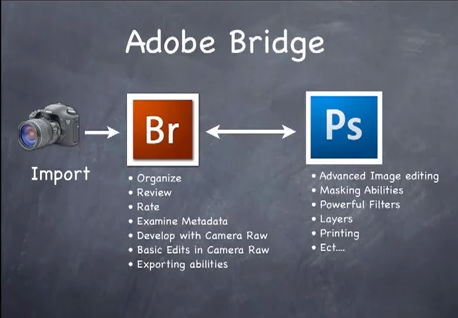
This week we learnt how to use adobe Bridge,Bridge is part of Adobe’s Creative Suite, and is a media browsing application. It is an app that enables you to view your entire computer contents, manage and organize your digital files, and edit your photos without the need to import and file them in various catalogs elsewhere.

What are the benefits of using Adobe Bridge?
-Adobe Bridge is a file browser, similar in many ways to the file browser you use with your computer's operating system. It's a complete file management system!
-quick to compare images and extract photo data
-Placing files into other apps
-batch renaming files
Metadata Templates
Adding copyright information to photos and documents is a must for many designers and/or photographers. Bridge allows you to quickly and easily apply metadata to your files (Tools > Append/Replace Metadata) and also allows you to craft templates to expedite the process even further (Tools > Create Metadata Template…). While there’s no tool to force people to respect and/or protect your copyright, at least this allows you to put your stamp on your work in the hopes that people won’t violate your rights as a creative.

Mini Bridge
The Mini Bridge panel is one of the best things Adobe has added in the past few years to (certain) Adobe Creative Cloud applications. While it’s currently only available in Photoshop and InDesign, the Mini Bridge allows you full access to your files directly from within the apps, allowing you to easily open/place files as needed without having to leave the app you’re working in.
Bridge can display thumbnail previews of all the images in a folder, and these thumbnails are fully customizable, giving us control over not just the size of the thumbnails but also other information displayed along with each one, like the file name, the dimensions of each image, the date created, copyright information, and much more!
Bridge also lets us change the sort order in which the thumbnail previews are displayed. We may want them ordered by file name, or by file type, by the date each file was created or modified, by file size or dimensions, by star rating (more on that later), or some other criteria, including our own manual sort order. Bridge gives us lots of options!
Bridge makes it easy for us to preview our images, with a Full Screen Preview mode that lets us instantly jump to a full screen view of any image for a closer look.
Class discussion:
Why use bridge?
-file management simple way to manage and view photos
-quick to compare images and extract photo data
-bridge photo downloader allows you to add copyright info to your metadata attached to your photos
-easy to sort your photos
-easy to rename your photos
-star ratings make it easy to sort images
Here are some of the few steps I learnt in class
-First we had to load our images from our camera onto bridge
-saving under different folders eg wk2 shutter exercise
-open up bridge to view our images which will be shown right at the bottom of bridge
-as shown below is a snapshot example of the different interfaces of bridge the ESSENTIALS
where i created my workspace on the left is the folders and favourites bar and the right at the bottom left is the favourites,metadata, ratings,copyright information,keyword etc i customised it to the right side of bridge

-to select more than 2 pictures press an image and hold down the shift key
-you can always customise your workspace to however you want it to be.
Reference:
http://www.photoshopessentials.com/essentials/bridge-cc/what-is-adobe-bridge/
http://justinseeley.com/tutorials/5-reasons-to-use-adobe-bridge/
File Formats

We did a group discussion of different file formats.Their advantages and disadvantages.
RAW-A camera raw image file contains minimally processed data from the image sensor of either a digital camera, image scanner, or motion picture film scanner.[1][2] Raw files are named so because they are not yet processed and therefore are not ready to be printed or edited with a bitmap graphics editor.
Advantages:
-opens up alot more options in post production
-get the highest level of quality
-record greater levels of brightness
-easily correct over exposed images
-easily adjust
-get better detail
-non-destructive editing
-get better prints
Disadvantages:
-it will make your workflow longer as RAW images need more time to process
-file size are bigger than JPEG
-need specialized software to edit raw file
-cant print RAW files
-cant send to clients in RAW format
PSD-A file is a layered image file used in Adobe PhotoShop. PSD, which stands for Photoshop Document, is the default format that Photoshop uses for saving data. PSD is a proprietary file that allows the user to work with the images' individual layers even after the file has been saved.
Advantages:
include layers,mask etc which will preserve your work
-recommended as working files due to large storage
-no compression on the PSD file format
-easily alters edit portion of photograph and manipulate the entire image
Disadvantages:
-PSD support outside of adobe inconsistent
-need to change format if sending away to a lab for printing
-cannot be shared on the web as a PSD
-cannot be opened in another editing software
-restricted to adobe factors
-one of the largest file types
TIFF- stands for "Tagged Image File Format" and is a standard in the printing and publishing industry. TIFF files are significantly larger than their JPEG counterparts, and can be either uncompressed or compressed using lossless compression.
Advantages:
-larger than jpeg
-can be uncompressed or compressed using lossless compression
-keep layers
-save as 32bit,24bit, or 16bit
-save as CMYK or RGB or grayscale
-wide range of resolution(typically use 300dpi)
-alpha channels
Disadvantages:
-files are large
-need an external drive to save a tiff format (more room to occupy them)
JPEG-The term "JPEG" is an abbreviation for the Joint Photographic Experts Group, which created the standard.JPEG is a lossy compression technique for color images. Although it can reduce files sizes to about 5% of their normal size, some detail is lost in the compression.
Advantages:
-High control degree of compression
-small file size
-suitable for full colour realistic images with a lot of colour and contrast transition
-picture quality is high with small compression
-format is compatible and it is displayed correctly in any browsers,text and graphics programs on all device.
Disadvantages:
-jpeg does not support layered images only 8 bit images are supported if you go higher than 8 the quality decreases
-JPEG is less suitable for working with text or monochrome graphics
-format does not support transparency
-every next step of compressing the image degrades quality


Comments
Post a Comment